Converters/Splitters/Adapters
-
StarTech DISPLAYPORT-to-DUAL DVI 3840x1200 Multi-Monitor Adapter (SP122DP2DV)SKU: StarTechDISPLAYPORT-to-DUALDVI3840x1200Multi-MonitorAdapterUS$ 60,00
The SP122DP2DVI DisplayPort® to Dual DVI Spanner/Cloner is an innovative, external multi-display/Multi-monitor adapter that allows you to add 2 DVI displays to your desktop or laptop from a single DisplayPort source.
This DisplayPort to 2x DVI graphics expansion module lets you combine 2 DVI monitors as one display, for a combined maximum resolution of 3840x1200, to create the ultimate widescreen desktop. The DP to dual DVI can also clone your primary display and function as a DisplayPort to dual DVI Video Splitter.
Compatible with a DisplayPort video card and DVI displays, the graphics expansion module requires no software installation for multi-display applications, simplifying configuration and saving time.
- DisplayPort to DVI Interface
- 1x DisplayPort Male
-
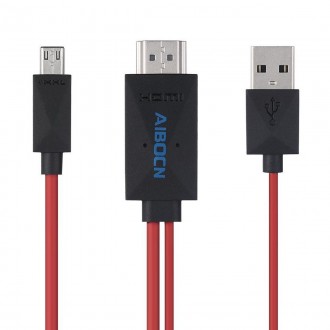
Aibocn 6.5ft MHL 11-Pin Micro USB to HDMI Adapter/Cable 1080p HDTV for Samsung DevicesSKU: Aibocn 6.5ft MHL 11-Pin Micro USB to HDMI Adapter/Cable SamsungUS$ 16,00
- Compatible devices - Smartphones: Galaxy S5, S4(i9500, i9505), S3(i9300, i9305); Samsung Galaxy Note 3: N5100 N9000 N9006; Samsung Galaxy Note 2: N7100 N7105; Tablets: Galaxy Tab 3 8.0 T310, Tab 3 10.1 P5210, Note 8 N5110, Note Pro.
- NOT compatible with Galaxy Tab 3 7.0, Note 10.1, Note 3 N9008V
- Well connect the Micro USB(MHL) cable into your devices, connect TV through the HDMI port, switch the TV to HDMI channel
- Well connect the USB cable to a power adapter (at least 5V 1A) to supply power for the HDMI connector (it will stop working automatically if no power is connecting
- When restarting your devices with the cable plugged, contents will be shown on TV, it's convenient to watch video or play game etc
NOTE:Meer Informatie
A)Do not connect the Adapter to your device through the Desktop dock. The video output will not work properly
B)Any incoming calls or messages will pause the media. After taking the calls or acknowledging the messages, the media will resume playing
C)After connecting the cable, the upper and lower sides of the TV/Monitor's screen may be cut off. If this happens, adjust the video settings on your HDTV and check your user manual for details
D)For a smoothly use, please ensure the juice of your devices is more than 40% capacity
How to use:
1).Connect the Micro USB cable into your cell phone or tablet
2).Connect TV through the HDMI port,switch the TV to HDMI channel
3).Connect the USB cable to a power adapter(at least 5V 1A) to supply power for the HDMI connector,you had better use the original adapter
4).Restart your device after the whole connection finished -
US$ 15,00
- Type: Mini DisplayPort male to VGA female
- Resolution: 1920x1080p
- Wire gauge: 32 AWG
- Outer diameter: 0.2in
- Conductor material: Tinned copper
- Housing: PVC
- Color: White
- Length: 6.7in